Princess MedallionClass Explained: What It Does, What It Doesn’t, And How To Use It
Princess Cruises does something a little different from many other cruise lines.
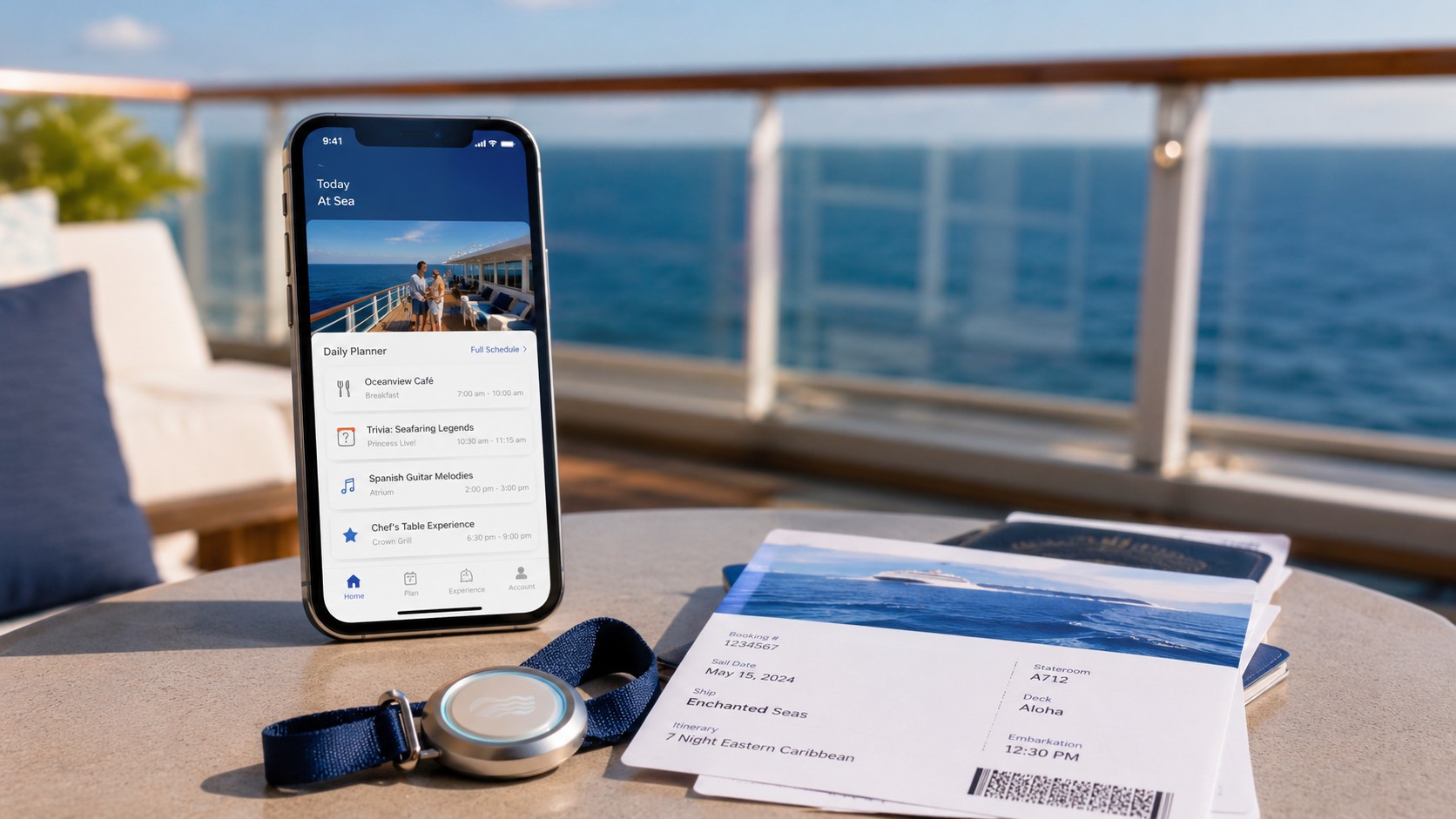
Instead of just handing you a traditional cruise card, Princess uses something called the Medallion — a small wearable device that acts as your room key, onboard charge card, boarding tool, locator, and part of the overall Princess app experience.
It sounds simple. And in some ways, it is.
But if you are taking your first Princess cruise, the whole MedallionClass system can feel a little confusing at first. There is the Medallion itself, the Princess Cruises app, OceanReady check-in, MedallionNet Wi-Fi, food and drink delivery, shipmate locator features, and package tie-ins with Princess Plus and Princess Premier.
So let’s break it down in plain English.
Need Help Planning Your Princess Cruise?
If you are trying to figure out whether Princess is the right cruise line for you — or how the packages, dining, app, Medallion, and itinerary options fit together — we can help.
Our Cruise Planning help is built around real travel style, real budget, and what actually matters for your trip.
If you have a question, feel free to text us at 480-331-1263.
Related Reading
- What to Know Before Your First Princess Cruise
- Princess Plus vs. Princess Premier: Which Package Is Actually Worth It?
- Princess Cruise Dining Guide: Main Dining, Casual Dining, Specialty Restaurants, and Room Service
- Princess Cruises Dress Code: Formal Nights, Smart Casual, And What People Actually Wear
What Is Princess MedallionClass?
Princess MedallionClass is Princess Cruises’ technology-based onboard experience, built around the small wearable Medallion.
More detail: What the MedallionClass system actually means
The center of the MedallionClass experience is your Medallion, a quarter-sized wearable device that helps personalize parts of your cruise. It can help with boarding, stateroom entry, onboard purchases, food and drink ordering, and locating travel companions who choose to share their location.
Think of it like a cruise card replacement, but with more features.
Instead of swiping or tapping a room key card everywhere, the Medallion connects with the ship’s systems as you move around. It can unlock your cabin door, help crew identify you for service, allow onboard purchases, and work with the Princess Cruises app for onboard tools.
That does not mean you need to be a tech expert to cruise with Princess.
But it does mean there are a few things worth understanding before you board.
What Does The Princess Medallion Actually Do?
The Medallion handles many of the small practical things you would normally use a cruise card for — plus a few extras.
More detail: The main Medallion features
In real-life terms, your Medallion can be used for:
- Unlocking your stateroom door
- Making onboard purchases
- Boarding and disembarking the ship
- Helping crew identify you for service
- Ordering food and drinks through the app
- Locating travel companions who choose to share their location
- Supporting a faster check-in and boarding process when set up ahead of time
For most people, the biggest day-to-day uses will be getting into the cabin, buying drinks or extras, getting on and off the ship, and using app-based features onboard.
Is The Medallion Free?
The basic Medallion is included with your Princess cruise, but accessories and add-ons can cost extra.
More detail: Where costs can come in
The Medallion itself is part of the Princess cruise experience. Where costs can come in is with accessories, customization, shipping, Wi-Fi, packages, and anything you purchase onboard.
Princess sells accessories and customization options if you want to wear the Medallion as a bracelet, clip, pendant, sports band, or another style. You do not need to buy fancy accessories for it to work.
A basic lanyard or standard holder may be perfectly fine. Some people like accessories because they make the Medallion easier to wear around the ship, pool, or port. Others would rather keep things simple and avoid another cruise upsell.
That is really the theme here: The Medallion is useful, but you do not need to overbuy around it.
What Is The Princess Cruises App?
The Princess Cruises app is where many of the MedallionClass features come together before and during the cruise.
More detail: What the app is used for
Before your cruise, the app helps with OceanReady steps such as check-in, travel documents, security photo, dining preferences, and other pre-cruise information.
Once onboard, the app can be used for things like:
- Viewing ship information
- Checking daily activities
- Ordering food and drinks
- Finding travel companions
- Managing dining
- Viewing account information
- Accessing Wi-Fi options
- Using onboard features tied to the Medallion
This is where some people love the system and some people get frustrated.
When it works well, it can make the cruise feel easier. When the app is glitchy, slow, or confusing, it can feel like one more thing to deal with when you are just trying to relax.
Our advice would be to set up as much as possible before the cruise and avoid waiting until embarkation day to figure it all out.
What Is OceanReady?
OceanReady is Princess’s pre-cruise readiness process, which is basically the digital check-in process.
More detail: Why OceanReady matters before boarding
OceanReady helps you get ready before boarding. You may be asked to complete steps like entering travel document information, adding a security photo, setting up payment, confirming personal details, and reviewing required information.
The more you complete ahead of time, the smoother embarkation should be.
That does not mean every cruise will be perfectly seamless. Cruise terminals, timing, crowd levels, document issues, and app glitches can still create delays. But doing the OceanReady steps early gives you the best chance of avoiding unnecessary problems at the port.
How Does Keyless Cabin Entry Work?
One of the most noticeable Medallion features is keyless stateroom entry.
More detail: What to expect at your cabin door
As you approach your cabin door, the system can recognize your Medallion and unlock the door. You do not have to pull out a card, tap a reader, or swipe anything.
This is one of those features that sounds minor until you are carrying coffee, bags, towels, or half your embarkation-day luggage.
That said, it is still technology.
Sometimes you may need to stand close enough to the door, wait a moment, or make sure your Medallion is positioned where the system can read it. It is convenient, but it is not magic.
Can You Order Food And Drinks With The Medallion?
Yes, Princess allows food and drink ordering through the MedallionClass experience in select onboard locations.
More detail: Why expectations matter with delivery
This can be especially useful if you are sitting somewhere comfortable and do not want to get up to stand in line.
But this is also an area where expectations matter.
Delivery may depend on where you are, what is available, how busy the ship is, and whether the app is working smoothly. It may be great sometimes and less impressive other times.
Our general mindset would be: Use it when it adds convenience, but do not build your whole cruise around it.
If delivery is slow, go to the bar. If the app is acting up, ask a crew member. If something does not show up, do not let it ruin the day.
Can You Find Other People On The Ship?
The Medallion can help you locate travel companions onboard, but only when location sharing is enabled.
More detail: When the locator feature can help
This can be helpful for families, couples, or groups who split up during the day. Instead of texting “Where are you?” repeatedly, you may be able to see where someone is on the ship.
That could be useful if one person is at the pool, another is at trivia, someone is in the casino, and someone else wandered off for coffee.
But it also depends on everyone being comfortable with the feature.
Some people love the convenience. Others may not want to be trackable at all times. That is a personal preference, and it is worth discussing before the cruise if you are traveling with a group.
How Does MedallionNet Wi-Fi Fit In?
MedallionNet is Princess’s onboard Wi-Fi system, and it often becomes part of the Princess Plus versus Princess Premier conversation.
More detail: Why Wi-Fi affects the package math
Princess has onboard Wi-Fi available through MedallionNet, and Wi-Fi is also included with Princess Plus and Princess Premier packages.
This is where MedallionClass, Wi-Fi, and package decisions start to overlap.
If you buy Princess Plus or Princess Premier, Wi-Fi is included as part of the package. If you do not buy one of those packages, you may be able to purchase Wi-Fi separately.
That makes Wi-Fi one of the biggest factors in deciding whether Princess Plus or Premier makes sense.
If you were going to buy Wi-Fi anyway, drink some beverages, and pay crew appreciation, Princess Plus may be easier to justify. If you do not care about Wi-Fi or drinks, the package math changes quickly.
Do You Need Princess Plus Or Premier To Use MedallionClass?
No. You do not need Princess Plus or Princess Premier just to use the Medallion.
More detail: The difference between MedallionClass and the packages
The MedallionClass experience is part of the Princess cruise experience. The packages affect extras like drinks, Wi-Fi, specialty dining, casual dining, photos, and other benefits depending on the package.
That distinction matters.
Some people hear about MedallionClass and assume they need a package to use it. You do not. But if you want Wi-Fi, drinks, and bundled extras, then Plus or Premier may be worth comparing.
What The Medallion Does Well
The Medallion system can genuinely make some parts of cruising easier, especially the small repetitive parts.
More detail: Where the Medallion adds convenience
The best parts are usually the simple ones:
- Unlocking your cabin without digging for a card
- Making onboard purchases easily
- Getting on and off the ship
- Finding people in your group
- Ordering drinks or food in certain locations
- Having a more personalized onboard experience
The biggest benefit is convenience.
It reduces the number of little things you have to think about during the cruise. You are still cruising the same way, but some small friction points are removed.
What The Medallion Does Not Do
The Medallion is useful, but it does not solve every cruise problem.
More detail: Where expectations need to stay realistic
The Medallion does not guarantee perfect Wi-Fi. It does not mean food and drink delivery will always be fast. It does not prevent app glitches. It does not mean every passenger will enjoy using their phone more during vacation.
It is also not a reason by itself to book Princess.
It is a nice onboard system, but the bigger reasons to choose Princess should still be the ship, itinerary, pricing, onboard vibe, dining, service, and overall fit for your travel style.
The Medallion is a tool.
A useful tool, but still just a tool.
What To Do Before Your Princess Cruise
The best thing you can do is handle the app and check-in basics before embarkation day.
More detail: How to get ready before sailing
Before your cruise, download the Princess Cruises app, log in, connect your booking, and complete as many OceanReady steps as possible. Check your travel documents, upload what is needed, add your payment method, and review your arrival information.
Also think through how you want to wear the Medallion.
You do not need to buy expensive accessories, but you do want a plan. A lanyard, clip, wristband, or basic holder can make a difference depending on how you like to travel.
If you are traveling with family or friends, talk about location sharing before the cruise. Some people may love the idea. Others may not.
And if Wi-Fi matters to you, compare the cost of buying Wi-Fi separately with the cost of Princess Plus or Premier.
What To Do Once You Board
Once onboard, test the basics — then stop overthinking it.
More detail: First-day Medallion tips
Make sure your Medallion opens your cabin door. Check that your onboard account looks right. Test the app before you actually need it. If you purchased Wi-Fi or a package, confirm that everything is showing correctly.
Then use the system where it helps.
Try ordering a drink. Check the daily schedule. Use ship navigation. See if the locator feature is useful for your group.
But do not spend your whole first day buried in the app.
One of the easiest ways to overcomplicate a cruise is to try to master everything immediately. Learn the important parts, ask questions when needed, and then get back to enjoying the ship.
Common MedallionClass Mistakes To Avoid
The biggest mistake is waiting until embarkation day to set everything up.
More detail: What can make the system feel harder than it needs to be
Embarkation day is when people are excited, rushed, trying to board, dealing with luggage, and figuring out lunch. It is not the ideal time to troubleshoot logins, documents, payment methods, or app settings.
Another mistake is assuming the app will replace basic cruise common sense.
If something is not working, ask a crew member. If food delivery is taking too long, go get something. If the app schedule seems confusing, look for printed materials, screens, or Guest Services.
And finally, do not buy accessories or packages just because Princess offers them.
Buy them if they solve a problem or add value for how you actually travel.
Who Will Like MedallionClass The Most?
MedallionClass is probably most useful for travelers who like convenience and do not mind using an app during vacation.
More detail: Who may get the most value from it
You may especially appreciate MedallionClass if you:
- Like using apps while traveling
- Want easier cabin access
- Travel with family or a group
- Plan to use Wi-Fi
- Like ordering drinks or snacks without always going to the bar
- Appreciate a more tech-forward cruise experience
It may feel less important if you prefer to put your phone away, avoid Wi-Fi, and keep your cruise as low-tech as possible.
That does not mean Princess is a bad fit. It just means you may use fewer Medallion features.
Final Thoughts
Princess MedallionClass is worth understanding, but it does not need to become the focus of your cruise.
The Medallion can make things easier. It can simplify cabin access, purchases, boarding, ordering, and finding people. It can also connect with bigger decisions like Wi-Fi and whether Princess Plus or Premier makes sense.
But it should not be overhyped.
You are still choosing a cruise based on the itinerary, ship, price, cabin, food, entertainment, and overall feel. The Medallion is part of the experience, not the whole experience.
For first-time Princess cruisers, the best approach is simple: Set it up before you sail, use the features that help, ignore the ones that do not, and do not let the technology become the focus of the trip.
That is probably the healthiest way to look at MedallionClass.
It is there to make the cruise easier.
Not to give you homework.
Latest Posts from Princess Cruise Lines | All Princess Cruise Line Posts
- Princess Gift Cards, Kroger Fuel Points, and a Real Way to Save on a Cruise

- Princess Cruises Dress Code: Formal Nights, Smart Casual, And What People Actually Wear

- Princess Cruise Dining Guide: Main Dining, Casual Dining, Specialty Restaurants, and Room Service

- Princess MedallionClass Explained: What It Does, What It Doesn’t, And How To Use It
- Princess Plus vs. Princess Premier: Which Package Is Actually Worth It?

- What to Know Before Your First Princess Cruise